Runtime Status Panel
Monitor GitOps Runtime health from a single pane — connectivity, applications, components, Git Sources, and managed clusters
Runtime Status Panel
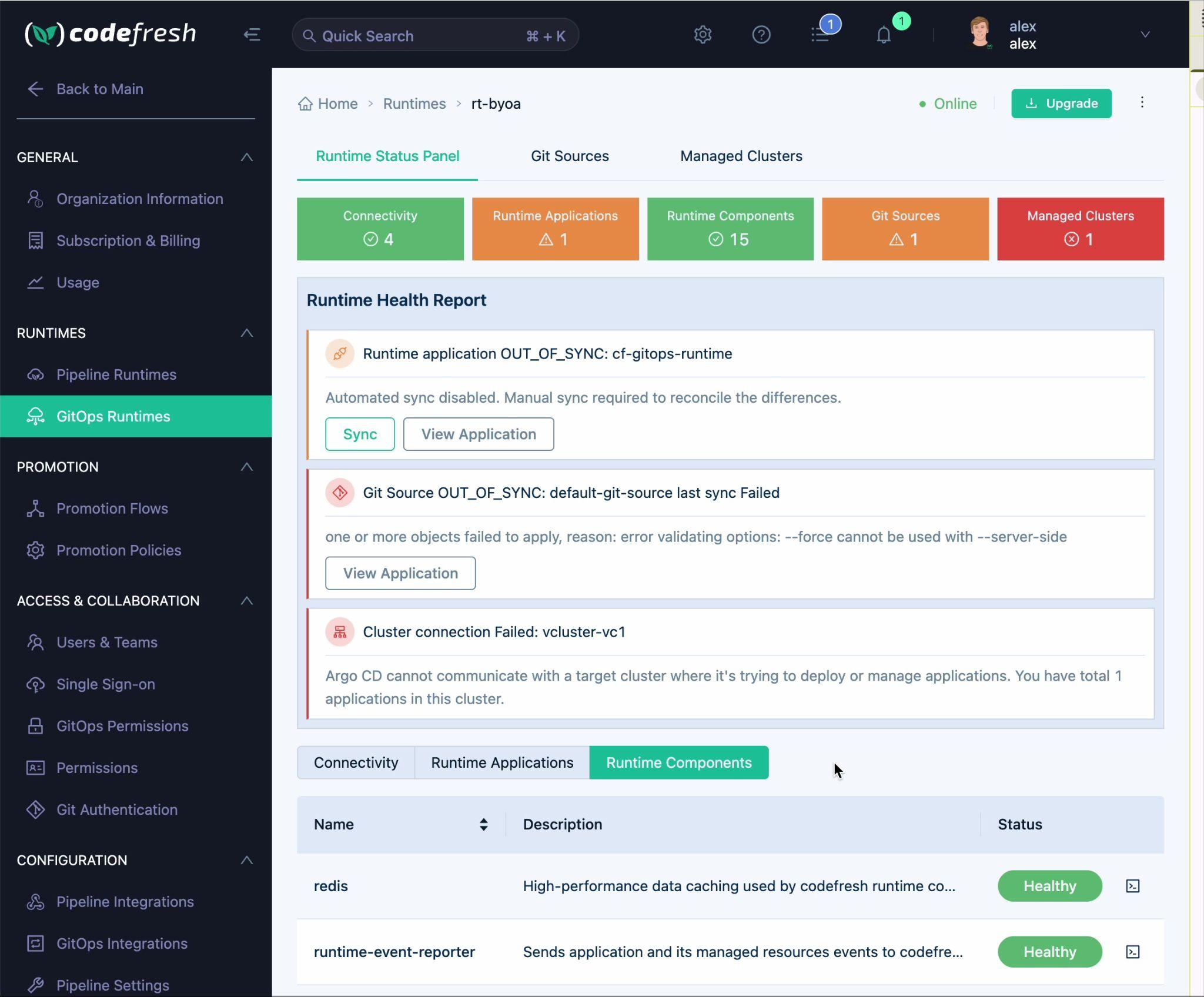
The Runtime Status Panel provides a single-pane view of your GitOps Runtime health, surfacing issues that previously required navigating multiple screens.
To open the Runtime Status Panel:
- In the Codefresh UI, on the toolbar, click the Settings icon.
- From the sidebar, select GitOps Runtimes.
- Click on the name of the runtime to open it.
- Select the Runtime Status Panel tab.
The panel is organized into three main sections:
- Status Summary Bar — Quick color-coded health overview across five categories
- Runtime Health Report — Actionable issues that need attention
- Detail Tabs — Deep-dive into connectivity, applications, and components
Status Summary Bar
Five color-coded boxes at the top of the panel give an at-a-glance health overview of your runtime.
| Category | Description |
|---|---|
| Connectivity | Network paths between browser, app-proxy, and control plane |
| Runtime Applications | Sync status of runtime applications |
| Runtime Components | Health of core components (redis, reporters, argo-gateway, etc.) |
| Git Sources | Sync status of configured Git Sources |
| Managed Clusters | Connection status of managed clusters |
Color coding
| Color | Icon | Meaning |
|---|---|---|
| Green | ✓ checkmark | All healthy — number shows total count |
| Orange | △ warning | Has warnings — number shows warning count |
| Red | ⊗ error | Has errors — number shows error count |
Note: The status boxes are indicators only and are not clickable.
Runtime Health Report
This section displays actionable issues that require attention. Each issue card includes:
- Issue type and affected resource — e.g., “Runtime application OUT_OF_SYNC: cf-gitops-runtime”
- Description — Explains what went wrong
- Quick actions — Clickable buttons such as Sync or View Application
Common issues
| Issue | Description | Available Actions |
|---|---|---|
| Runtime application OUT_OF_SYNC | Automated sync was not able to complete | Sync, View Application |
| Git Source sync Failed | Git Source failed to synchronize (e.g., conflicting options) | View Application |
| Cluster connection Failed | Argo CD cannot communicate with the target cluster | View Application |
Detail Tabs
Three tabs provide detailed information for troubleshooting specific areas of your runtime.
Connectivity tab
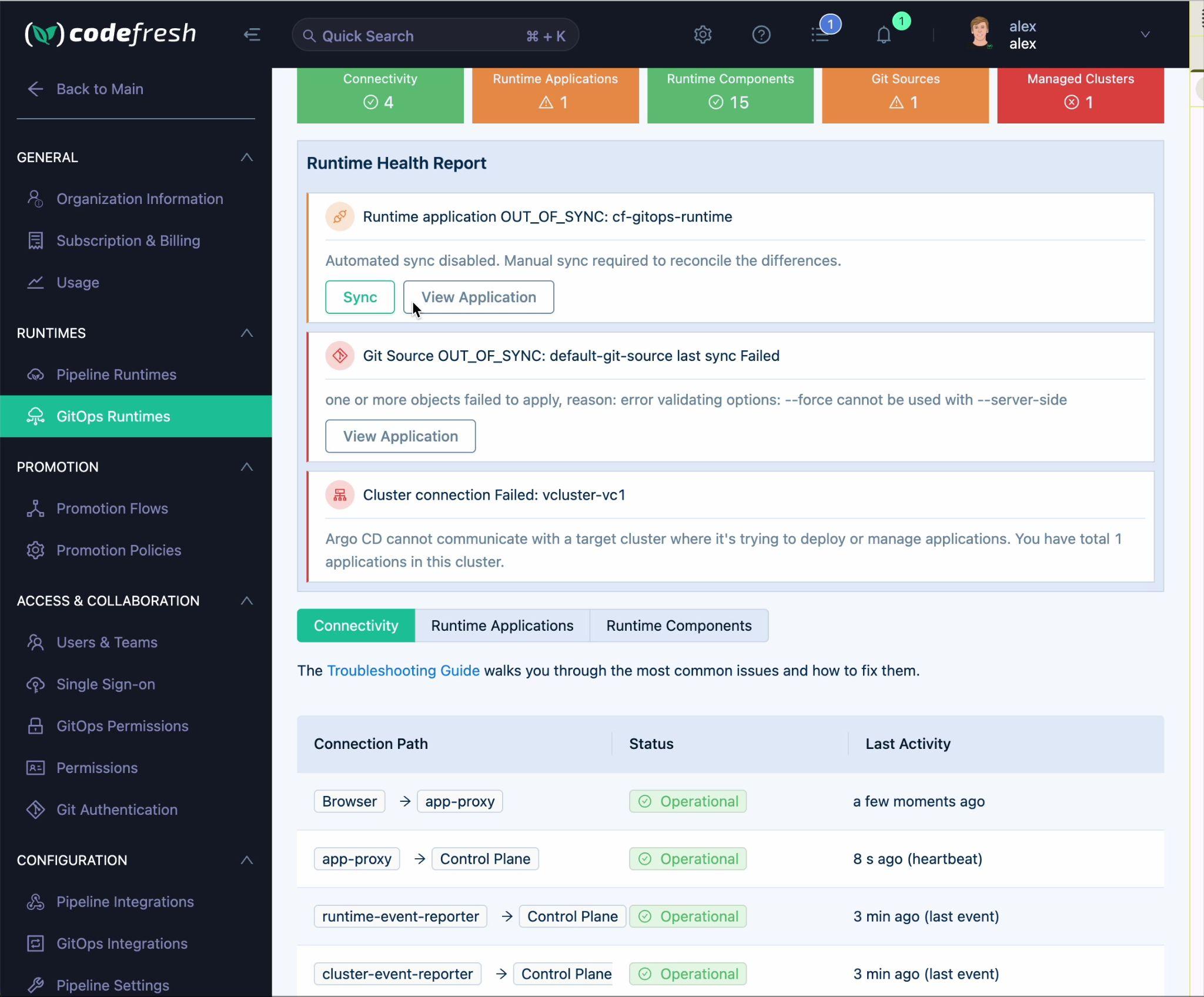
Displays the status of all connection paths between runtime components.
| Connection Path | Description |
|---|---|
| Browser → app-proxy | Connection from your browser to the app proxy |
| app-proxy → Control Plane | Connection from app proxy to Codefresh control plane |
| runtime-event-reporter → Control Plane | Reporter sending application and resource events |
| cluster-event-reporter → Control Plane | Reporter sending cluster events |
Columns: Connection Path | Status | Last Activity
Status behavior
- Connectivity checks retry every 10 seconds
- App-proxy shows Unreachable after a 1-minute timeout
- Reporters are flagged as non-reporting after 20 minutes
Connectivity warning
When connectivity issues are detected, a warning banner appears above the connection table.
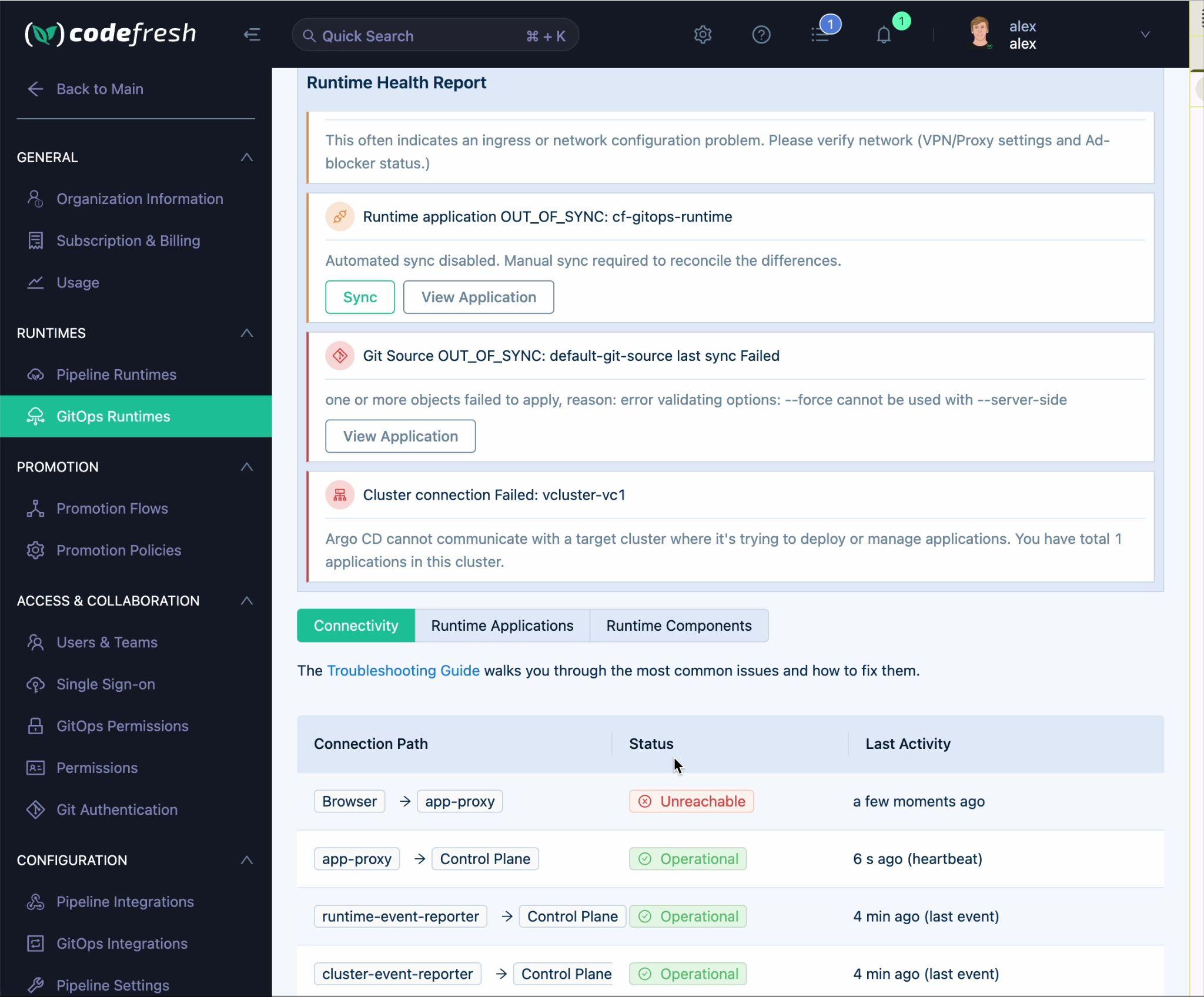
“This often indicates an ingress or network configuration problem. Please verify network (VPN/Proxy settings and Ad-blocker status.)”
A link to the Troubleshooting Guide is provided within the banner for the most common resolution steps.
Runtime Applications tab
Lists all runtime applications with their sync and health status.
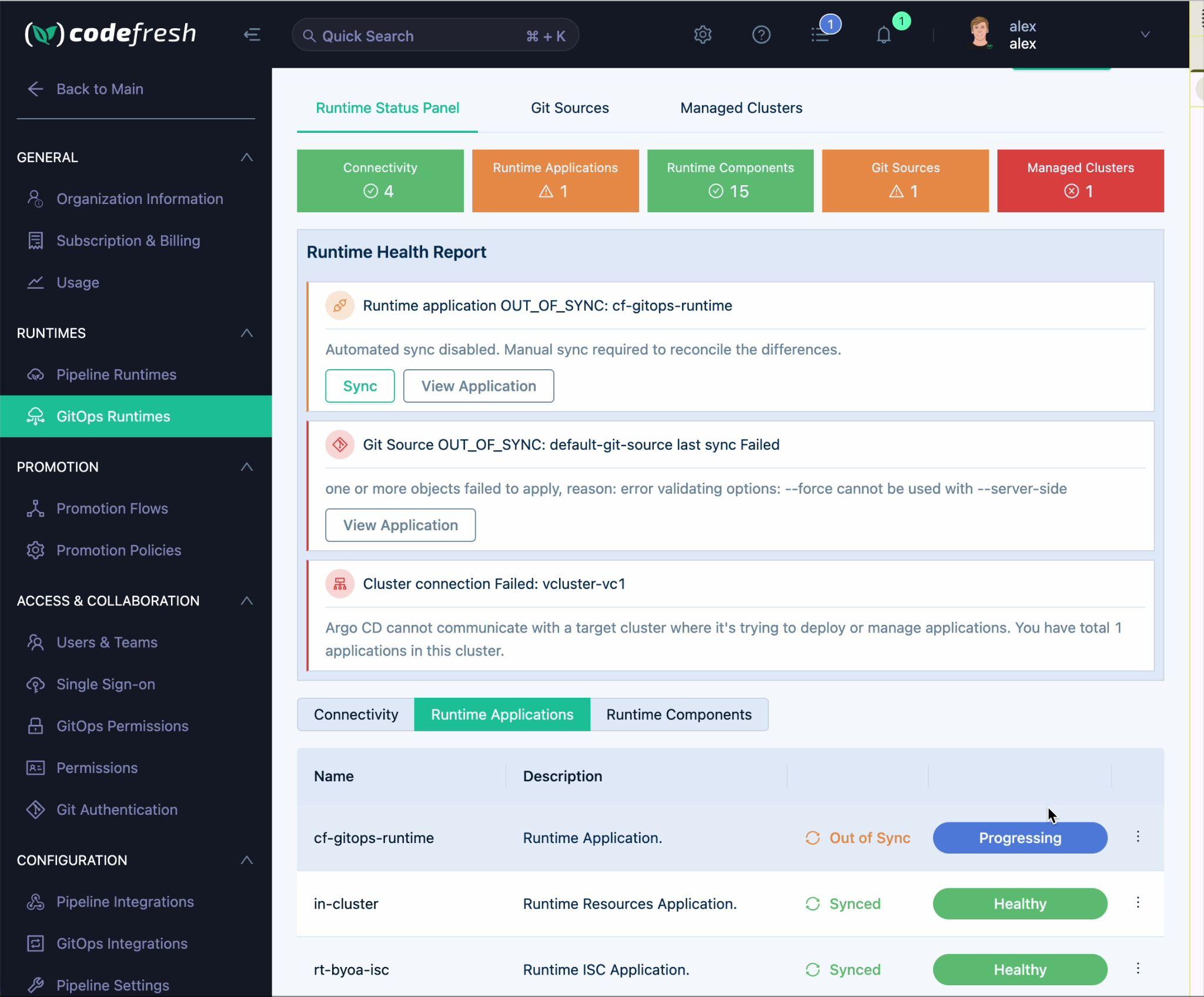
Columns: Name | Description | Sync Status | Health Status | Actions
| Field | Description |
|---|---|
| Name | Application name — click to open the application details page |
| Sync Status | Synced / Out of Sync |
| Health Status | Healthy / Progressing / Degraded |
Row actions (⋮ context menu):
- Quick view
- Synchronize
- Refresh
- Hard refresh
Runtime Components tab
Lists all runtime components with their descriptions and health status. Health statuses are aggregated from the underlying deployments and StatefulSets.
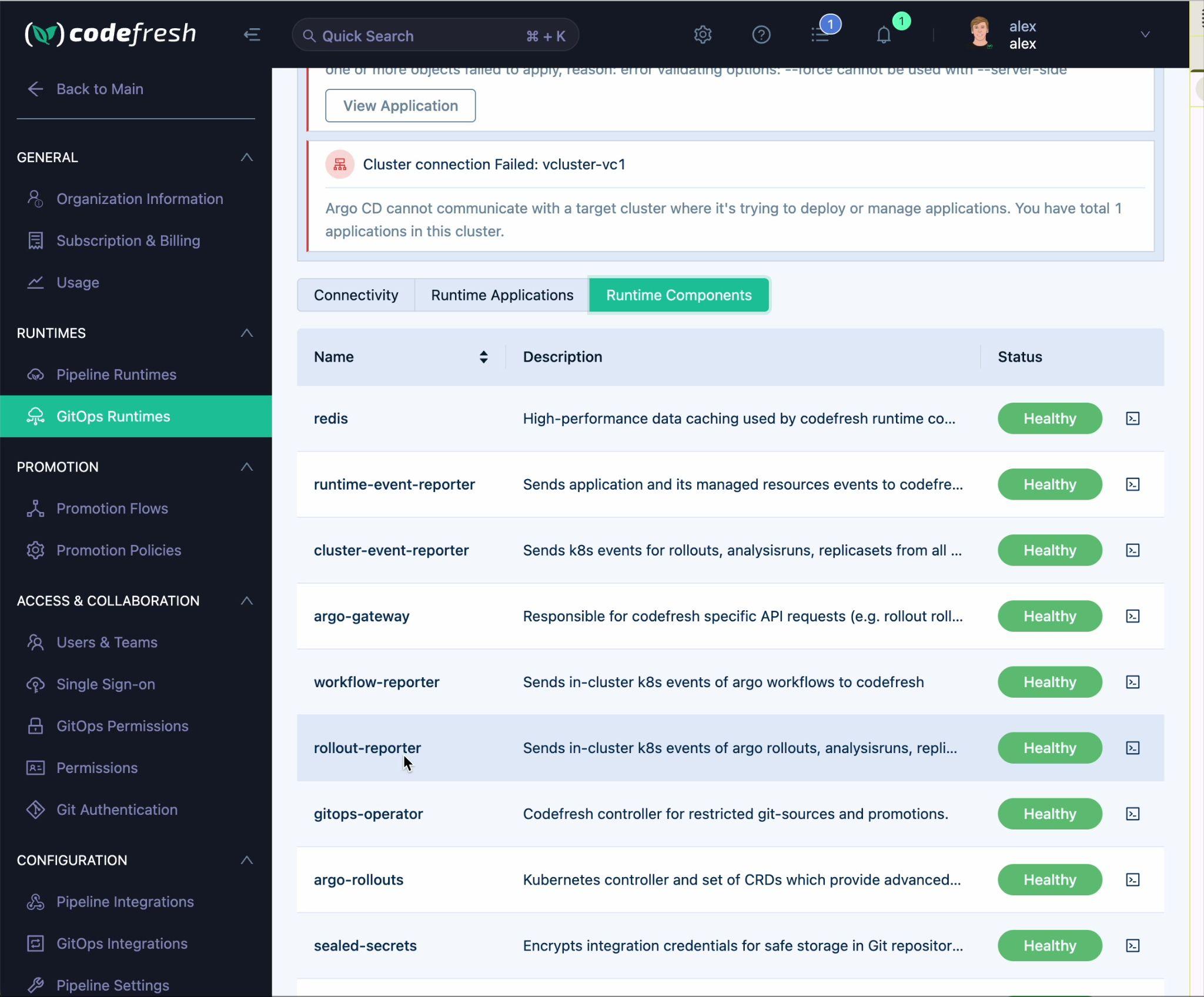
Columns: Name | Description | Status | Actions
| Component | Description |
|---|---|
| redis | High-performance data caching used by the Codefresh runtime |
| runtime-event-reporter | Sends application and managed resource events to Codefresh |
| cluster-event-reporter | Sends K8s events for rollouts, analysis runs, and replicasets |
| argo-gateway | Handles Codefresh-specific API requests (e.g., rollout rollback) |
| workflow-reporter | Sends in-cluster K8s events of Argo Workflows to Codefresh |
| rollout-reporter | Sends in-cluster K8s events of Argo Rollouts, analysis runs, and replicasets |
| gitops-operator | Codefresh controller for restricted Git Sources and promotions |
| argo-rollouts | Kubernetes controller and set of CRDs for advanced deployment strategies |
| sealed-secrets | Encrypts integration credentials for safe storage in Git repositories |
Row actions:
- View Logs icon — opens component logs for troubleshooting
Related articles
Monitoring GitOps Runtimes
Managing GitOps Runtimes
Managing external clusters in GitOps Runtimes
Managing Git Sources in GitOps Runtimes
Troubleshooting GitOps Runtimes